


 JSON Lines Editor
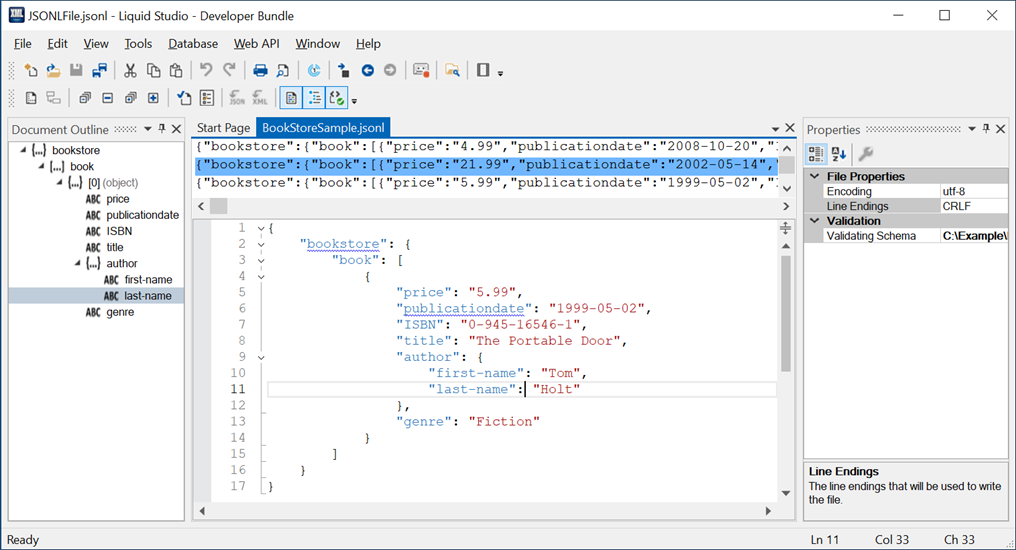
The JSON Lines Editor makes it possible to easily view, edit, and validate JSON Lines documents compliant with the JSON Lines Standard.
The top view has a large file editor capable of loading of huge (Terabyte+) JSON Lines files instantly.
The bottom view has a rich text based editor representing the selected JSON Lines data of the top view, which provides syntax highlighting, well-formed and schema aware validation, auto complete/intellisense based on a JSON Schemas, go to JSON Schema definition, and much more.
Associated features and tools include:
Intellisense/Auto Complete
The JSON Lines Editor intelligently calculates the auto complete options from an associated JSON Schema. So you are presented with the properties, and types that are permitted, at the current location in the file. Annotations are read from the JSON Schema and presented as tooltips, to provide context sensitive help.

Document Outline View
The document outline shows the current JSON document as a tree. The selection in the editor and the document outline remain in sync making it quick and easy to navigate large or complex documents.

Goto Definition
Jumps to the JSON Schema definition of the currently selected item within the JSON Document.
Validation
Determines if a JSON document is both well-formed and valid against an associated JSON Schema. Errors are shown inline within the JSON document and in the error window as you type.
Outlining (Code Folding)
The JSON Editor allows elements within the JSON document to be collapsed, thus maximizing your working area to simplify editing large files.
Document Formatting
The JSON Editor provides a 'Format JSON' option which indents all the elements correctly, making the JSON document simple to read.
Syntax highlighting
The JSON Editor provides syntax highlighting which makes your JSON code easier to develop, allowing errors to be avoided.
File change notification
The user is notified when the file they are working on is changed by an external editor.
Spell Checking
Liquid JSON Studio contain a powerful SpellChecker. The SpellChecker highlights spelling mistakes inline in real time as you type, mistakes can then be corrected by clicking on them and selecting the correct spelling.


