Function Name |
JSON Data Source | ||||||
Category |
JSON | ||||||
Icon |
 |
||||||
Description |
Allows data to be read from a JSON file. | ||||||
Inputs |
|
||||||
Outputs |
|
||||||
Properties |
|
||||||
Usage
Allows JSON documents to be used as a data source within the Data Mapper.
Inputs
The component has 2 inputs, 'Filename' and 'JSON String', only one of these can be used at a time (you can only connect one of them within a given transform).
If the 'Filename' input is connected then the value read from the connector will be treated as the filename for the JSON document to load (if the connector provides a sequence of filenames, then multiple JSON documents are loaded).
If the 'JSON String' input is connected then the value read from the connector will be treated as raw JSON data and loaded into the document (if the connector provides a sequence of values, then each is treated as a separate JSON document and multiple documents are loaded).
If neither of the inputs are connected then the filename is taken from the default filename (accessible via the properties window).
Creating an JSON data source
To begin, drag the JSON Source component from the JSON section of the Component Palette onto a new Data Mapper file.
This will cause the wizard to launch

In order to read data from a JSON document, the Data Mapper needs to be aware of its structure.
Json Schema
Loads the JSON Schema from the file specified.
Infer a JSON Schema from a sample JSON document.
If you don't have a JSON Schema then you can infer one from a sample JSON document, select this option and press next.
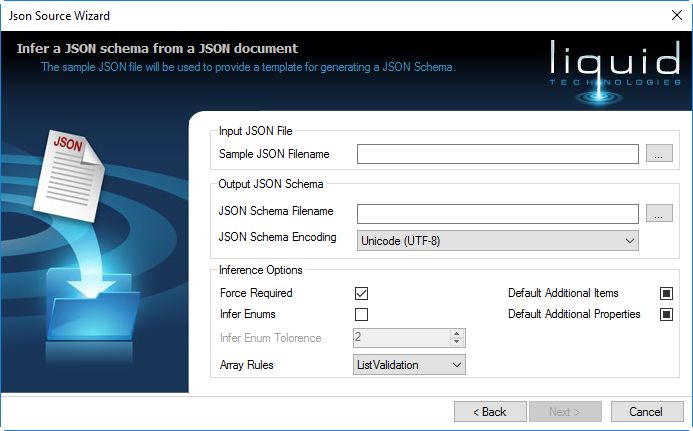
This wizard page allows you to infer a JSON Schema from a sample JSON document.
Sample JSON filename
A JSON file containing data that is representative of the data you intend to load. The better the sample data the better the results.
As far as possible ensure that the file contains all the possible combinations of data you expect to see, and try to show objects with and without optional fields.
If your data is very complex you may need to refine the results afterwards using the JSON Schema Editor.
JSON Schema filename
The generated JSON Schema fill be written here.
JSON Schema Encoding
The encoding used to write the JSON Schema.
Force Required
Makes objects definitions required/mandatory if it that has not been identified as optional. If this is not set then all objects are declared as optional.
Infer Enums
When checked the values within objects and arrays are generated as Enumerated values using the unique values in the sample document.
so if an array contained ["true", "false", "false", "false", "true" ] this would be inferred as an enumeration with the values "true", "false".
Infer Enum Tolerance
A tolerance factor for determining if a set of values can be considered an enumeration or free text.
They will be considered an enumeration if (NoOfSamples/UniqueValues) > InferEnumTolorence.
Array Rules
- AllowAnything - Any kind of item is allowed into the array (not recommended as untyped values are difficult to work with in the Data Mapper)
- ListValidation - All items comply to the same schema. Each item in the array is considered to be of the same type, and the definition of that type is derived from all the items in the array.
- TupleTyping - Each item in the array is described using its own schema based on its index in the array (this is rarely how data is formatted in real world documents).
Default Additional Items
Indicates if additional items are allowed within the schemas definitions produced. This is a 3 state field.
- If checked additional items are allowed
- If unchecked additional items are NOT allowed
- Else the 'additionalItems' property is omitted (in which case it defaults to true)
Default Additional Properties
Indicates if additional properties are allowed within the schemas definitions produced. This is a 3 state field.
- If checked additional properties are allowed
- If unchecked additional properties are NOT allowed
- Else the 'additionalProperties' property is omitted (in which case it defaults to true)
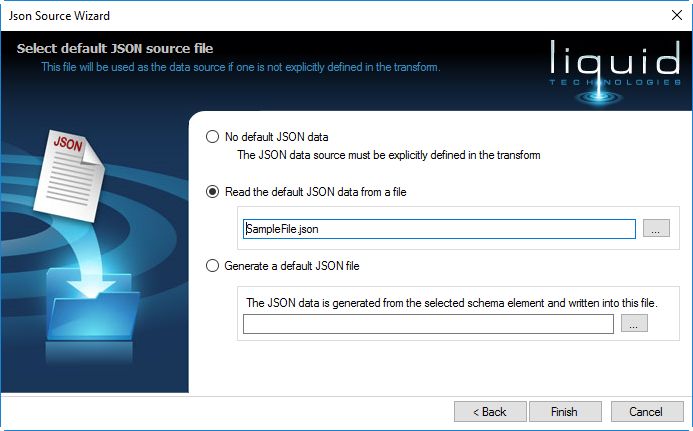
Allows you to select the JSON data that this components represents.
No default JSON Data
No data is associated with the JSON Reader, it is expected that either the 'Filename' or 'JSON String' input values will be connected within the transform.
Read the default JSON data from a file
JSON Data is read from the filename provided (the filename can be an absolute path or can be a relative path which will be evaluated relative to the transform file)
Generate a default JSON file
A sample JSON document is generated from the JSON Schema.
When the wizard is complete pressing the Finish button will created the JSON Reader component on the transform.

To better understand the way in which the JSON schema is translated into the JSON Reader component, see How a JSON Schema is translated into a Data Mapper Component.
If multiple inputs files are opened (if multiple 'Filename' or 'JSON String' values are provided), then the root item will be a sequence (each holding a document corresponding to the input source).