Function Name |
PDF Form Data Target | ||||||
Category |
PDF Form | ||||||
Icon |
 |
||||||
Description |
Writes data to an PDF Form. | ||||||
Inputs |
|
||||||
Outputs |
|
||||||
Properties |
|
||||||
Creating an PDF Form File Target
When the PDF Form Writer component is dragged onto a transform a setup wizard is launched to guide you through the creation of the data target.
PDF Form Data
The wizard allows you to select your PDF Form file to use as a template containing the structure of the data you want to read, and optionally, a default file from which to write the output PDF Form data.
You can also specify if the output PDF Form should be Read Only, this is useful if you do not want to permit further editing of the document.
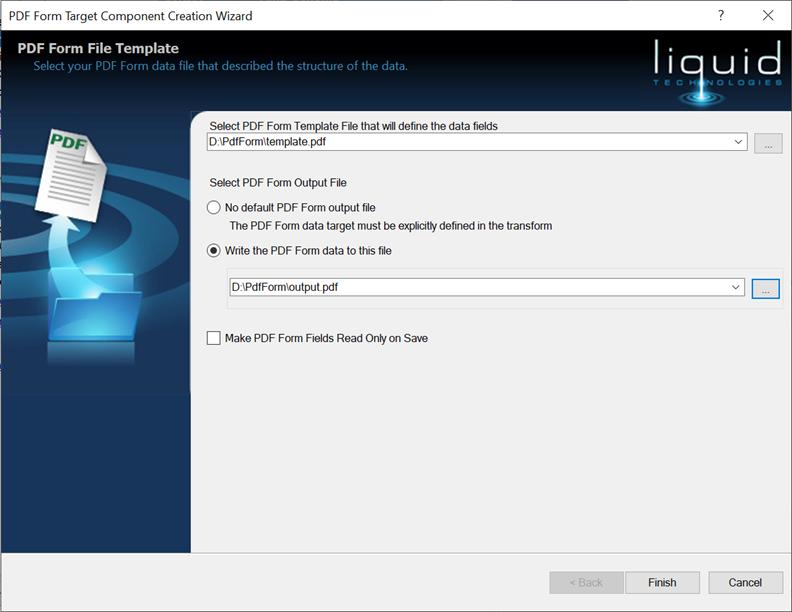
Once you press Finish the new PDF Form Data target is added to the transform and can be used as any other data target is.
Property Pages

Name
The name of the component, must be unique within the transform

Edit Columns
Allows the column definitions to be manually edited.

Default output filename
If the writer component does not have a connector to the 'Filename' input then the filename the data is written to is taken from this property.
If the connection point 'Filename' is connected, then this property is ignored (and can be blank)
Store as relative path
Indicates that the filename is to be resolved relative to the data mapping file (.dm). If the transform is compiled the filename will be resolved relative to the compiled exe.
Default Encoding
The encoding used to write the text data to a file.
Write column heading on first line
If checked then all the column headings are written onto the first line of the file.
Inputs
The component has a root input called 'Filename', each value provided to this is treated as a filename and a new PDF Form document is created.
If the 'Filename' input is not connected then the "Default target file" is used (see properties window).
The child inputs are all specific to the PDF Form template you selected when the component was created.