JSON Lines is a data format for storing structured data as JSON, that may be processed one record at a time. Each line is a valid JSON document, and each line is terminated with a '\n' character.
This is useful for example, when writing log files as each new record is written as a new JSON document, not as part of a single JSON document.
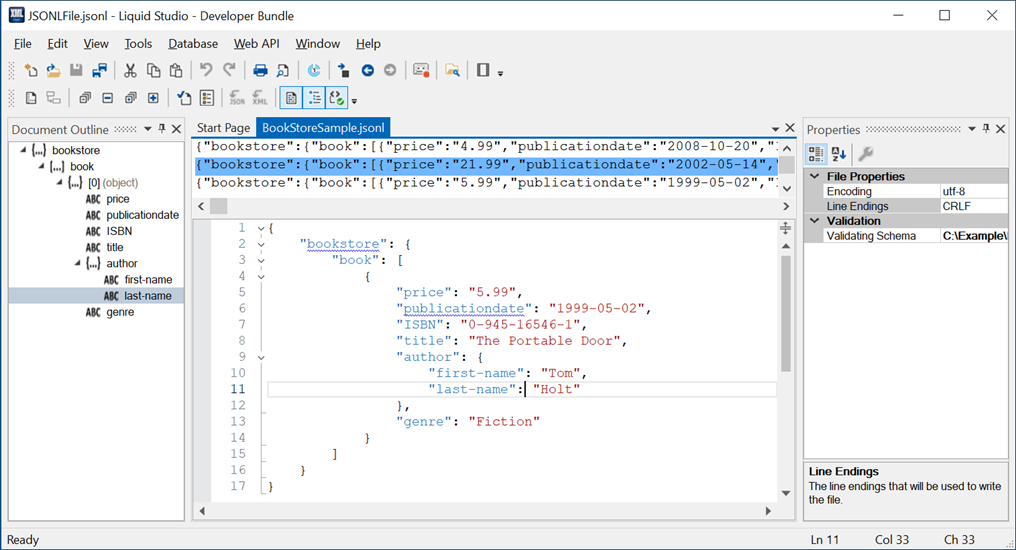
The JSON Lines Editor displays the entire JSON Lines file's data in the top view, as minified JSON, and an individual line's data in the bottom view as and expanded JSON document.
The top view uses a Large File Editor, meaning that gigabytes of data can be loaded and edited.
The bottom view uses the standard JSON Editor.
Validation
You can validate the entire JSON Lines file in the top view, this will validate each individual line as a JSON document for well formedness. You can also validate an individual document in the bottom view.
You can also attach a JSON Schema to the JSON Lines file. This schema is used to validate each individual line within the JSON Lines document.