


 XML Editor
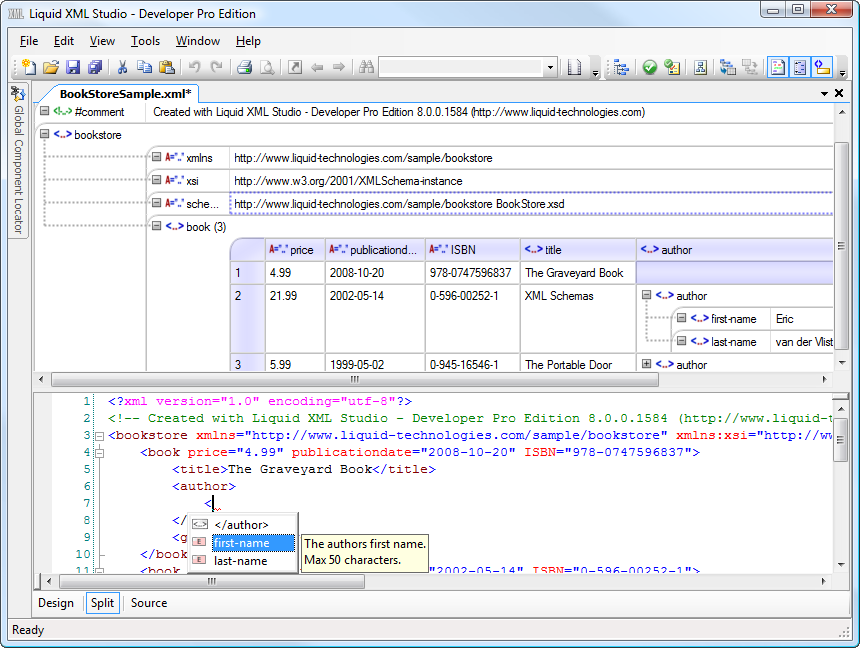
An advanced XML Editor containing tools to Edit, View, Validate, Read and Format XML Documents.
A rich text based editor provides syntax highlighting, well-formed validation, schema aware validation for XSD 1.0, XSD 1.1, Schematron & RelaxNG, auto complete, schema aware intellisense, go to XSD definition, spell checking, and much more.
The XML document can also be viewed and edited in a grid/tabular view. Each element within the document can be pivoted allowing its children to appear as columns within a table. This makes it easy to import/export data from other data sources such as Excel and SQL Server.
The text and tabular views can also be seen side by side in a split view making it easy to see the impact of changes made in the tabular view.
XML Grid Editor
The XML Grid Editor allows you to create and edit your XML data in the form of a tree or table. The standard tree based paradigm is often very limiting when editing repeated sets of data. The Table paradigm makes the data more accessible, presenting it more like a spread sheet, making it easy to view and edit.

In the tree view the XML document is represented as hierarchy of nodes. Each element or attribute being represented as a leaf. In the table view a group of element of the same type are represented as a table, each row in the table represents an element, and each cell a child element or attribute. Any group of XML elements can be represented as a tree or table, and each group can be switch between views using the context menu.

When being viewed as a table, row and column level operations can be performed, for example adding an column would add an element/attribute to every row (and thus every element that represents the row) in the table.
Split View Editing
The XML Editor can be used in Split View Mode, which shows the XML source code along side the grid view. Changes to the grid view are instantly reflected in the code view, and changes to the code are reflected in the model when it is selected again.

The selection in the grid view is also tracked in the source code, in this case, as a column is selected in the grid view all of the corresponding child elements are selected in the code view.
Intellisense
The XML Editor intelligently calculates the auto complete options from an associated set of XML Schemas. So you are presented with the attributes or elements that are permitted, at the current location in the file. Annotations are read from the XML Schema and presented as tooltips, to provide context sensitive help.

Validation
The XML Editor checks that your XML document is both well-formed and valid against associated XML Schema. The following XML Schema's formats are supported:
- DTD - Microsoft .Net XML Validator & Xerces
- XSD 1.0 - Microsoft .Net XML Validator & Xerces
- XSD 1.1 - Microsoft .Net XML Validator
- RelaxNG - Mono
- Schematron - Running via Saxon XSLT Engine
Errors reported in real time as you type, and shown inline within the XML document and in the error window.

Document Outline View
Simplifies navigating large XML documents. A tree view showing all the XML Elements and attributes is shown alongside the XML document and is updated in real time as you type. Selecting a node in the tree takes you to the corresponding place in the document. Learn more...

XPATH Query Viewer
XPATH Query Builder is a tool window that is automatically associated with the current XML Editor. The results of the XPATH Query are automatically highlighted in the XML Editor as you type, XPATH intellisense options are provided based on the associated XML Editor, making it quick and easy to construct and test XPATH queries. Learn more...

Navigate to XML Schema Definition
When an XML document has been associated with an XML Schema, it is possible to navigate directly from and XML element or attribute to the corresponding definition in the XML Schema. Simply right click on the attribute or element and use the right click menu 'Navigate to Definition'.

Outlining (Code Folding)
The XML Editor allows elements within the XML document to be collapsed, thus maximizing your working area to simplify editing large files.

Breadcrumb
It can be difficult to determine the current location within large XML documents. The simple breadcrumb tool makes it easy to see all the parent elements back to the root of the document. Selecting a breadcrumb item navigates to the appropriate place in the document. Learn more...

Other Features
- Spell Checking - The SpellChecker highlights mistakes inline in real time as you type.
- XML Sample Generator - Create Sample XML documents from an XML Schema.
- Infer an XML Schema (XML to XSD) - Generated an XML Schema from an XML document.
- File change notification - The user is notified when the file they are working on is changed by an external editor.
- Canonical Form - Convert XML documents to their Canonical form - allows comparison at the logical level and facilitates the digital signing of documents.
- Document Formatting - The 'Format XML' and 'Format Selection' option which indents all the elements correctly, making the XML document simple to read.
- Auto Complete - The XML Editor provides Auto Complete which automatically closes elements and provides auto formatting as you type.
- Syntax highlighting - The XML Editor provides syntax highlighting which makes your XML code easier to develop, allowing errors to be avoided.


