JSON Schema Property 'chrome_url_overrides'
Description
Override pages are a way to substitute an HTML file from your extension for a page
that Google Chrome normally provides.
Diagram
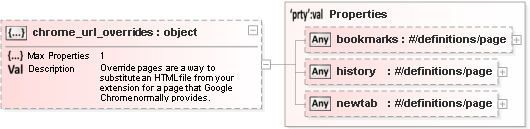
Source
"chrome_url_overrides": {
    "type": "object",
    "description": "Override pages are a way to substitute an HTML file from your extension for a page that Google Chrome normally provides.",
    "additionalProperties": false,
    "maxProperties": 1,
    "properties": {
        "bookmarks": {
            "$ref": "#/definitions/page",
            "description": "The page that appears when the user chooses the Bookmark Manager menu item from the Chrome menu or, on Mac, the Bookmark Manager item from the Bookmarks menu. You can also get to this page by entering the URL chrome://bookmarks.",
            "default": "bookmarks.html"
        },
        "history": {
            "$ref": "#/definitions/page",
            "description": "The page that appears when the user chooses the History menu item from the Chrome menu or, on Mac, the Show Full History item from the History menu. You can also get to this page by entering the URL chrome://history.",
            "default": "history.html"
        },
        "newtab": {
            "$ref": "#/definitions/page",
            "description": "The page that appears when the user creates a new tab or window. You can also get to this page by entering the URL chrome://newtab.",
            "default": "newtab.html"
        }
    }
}
http://json.schemastore.org/chrome-manifest (91:6)
References
Documentation for Chrome Manifest
Generated using Liquid Studio 2018 - JSON Studio Edition 16.0.0.7949
Generated using Liquid Studio 2018 - JSON Studio Edition 16.0.0.7949