


 Tools for Microsoft Visual Studio

Liquid Studio integrates smoothly into Microsoft Visual Studio allowing you to develop your XML and XSD applications within the familiar Visual Studio environment.
The Liquid Technologies Visual Studio Extensions include the graphical XSD Editor, JSON Schema Editor, WSDL Editor, Web Service and XPath Tools and they take advantage of the common framework offered within Visual Studio, making use of the properties panel, error window, and find and replace dialogs.
Liquid Studio supports integration with:
Visual Studio Extension Features
- Graphical XML Schema Editor for Visual Studio
- Graphical JSON Schema Editor for Visual Studio
- Graphical WSDL Editor for Visual Studio
- Adds an XPath Query Builder & Results Viewer to all XML Editors in Visual Studio
- Adds the ability to make ad-hoc calls to Web Services
- Use of standard Visual Studio Error Window
- Use of standard Visual Studio Properties Window
- Use of standard Visual Studio Find and Replace Windows
- Integrates with Visual Studio
XML Schema Editor
The XML Schema Editor can be used within Microsoft Visual Studio providing the same rich editing environment you get from Liquid Studio. The standard Visual Studio properties windows are used to make it possible to view and edit the detailed properties on any item in the diagram ensuring a familiar environment for Visual Studio users.
Documentation Tool Window
View and edit annotations (schema documentation) for the selected schema item. These comments can then picked up by other tools, XML Editors, Validators, XSD generated documentation etc.
Global Component Locator Tool Window
This window shows all the root/global objects defined within the schema (and its children). Double clicking on an item takes you to the definition, even if its in another file.
Standard Tools
The extension includes all the normal features you have become used to in Visual Studio, integrated find & replace, cut & paste, drag & drop. As well as file change notifications, and printing etc.
WSDL Editor
The WSDL Visual Studio Extension allows WSDL 1.1 and 2.0 documents to be viewed and edited within the Microsoft Visual Studio Environment. The WSDL file can either be edited via the graphical editor or in the code view. The split code/model view keeps in sync as edits are made.

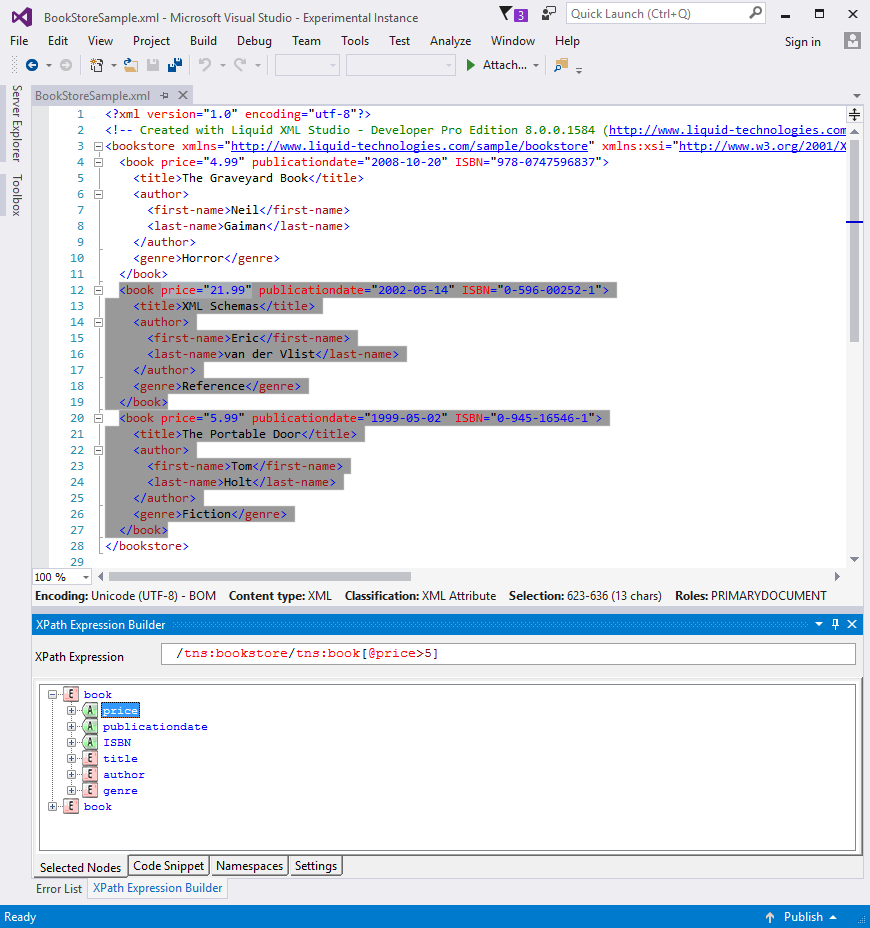
XPath Expression Builder
The XPath Expression builder is an additional tool window that binds to the active XML editor. The XPath expression in the tool window is run against the data in the XML Editor and the results highlighted in real-time. The XPath expression in the tool window supports intellisense based on the content XML Editor, and has tools demonstrating the use of the expression in a number of programming environments.
REST Web Service Test Client
This tool allows you to browse an OpenAPI (Swagger) web service, select a web method, call the method and view the results.
Once a web method is selected, the tool automatically generates sample JSON or XML REST request message data based on the description within the OpenAPI (Swagger) definition. You can then change this request, adding in your own values.
The web request can then be saved, so it can be re-used later, very useful in a testing and development environment.

SOAP Web Service Test Client
This tool allows you to browse a WSDL web service, select a web method, call the method and view the results.
Once a web method is selected, the tool automatically creates the SOAP envelope and generates a sample XML request message based on the description within the web service description (WSDL). You can then change this request, adding in your own values.
The web request can then be saved, so it can be re-used later, very useful in a testing and development environment.

JSON Schema Editor
This powerful graphical JSON schema editor integrates into Microsoft Visual Studio providing the same rich editing environment you get within Liquid Studio. The standard Visual Studio properties windows are used to make it possible to view and edit the detailed properties on any item in the diagram ensuring a familiar environment for Visual Studio users.


